




On-Page SEO Checklist for Bloggers – 10 Things You Must Do in 2026
Let me tell you something nobody wants to admit.
You can write a genuinely brilliant blog post well-researched, clearly written, genuinely useful and it can still sit on page four of Google where nobody will ever find it.
Not because the content is bad. But because the on-page SEO was ignored.
This is the uncomfortable truth about blogging in 2026. Great content is the entry ticket. But on-page SEO is what actually gets you ranked. And most bloggers either skip it entirely or do it halfway which is almost worse than not doing it at all.
This guide fixes that. Below is a practical, no-fluff on-page SEO checklist for bloggers ten things you must do before and after publishing every single post if you want to rank on Google in 2026.
What Is On-Page SEO and Why Does It Still Matter in 2026?
On-page SEO refers to everything you optimise directly on your page your title, headings, content structure, images, internal links, and more. It is the part of SEO that is entirely in your control, which makes it both powerful and important.
Google in 2026 is smarter than it has ever been. It understands context, intent, and quality better than any previous version. But that does not mean on-page optimisation no longer matters. If anything, it matters more because the bar for what Google considers a well-structured, authoritative page has risen significantly.
The on-page SEO factors that drive rankings today are not just about keywords. They are about how clearly your page communicates its topic to both readers and search engines. Get that right and you give your content a genuine chance to rank. Ignore it, and even your best work will struggle.
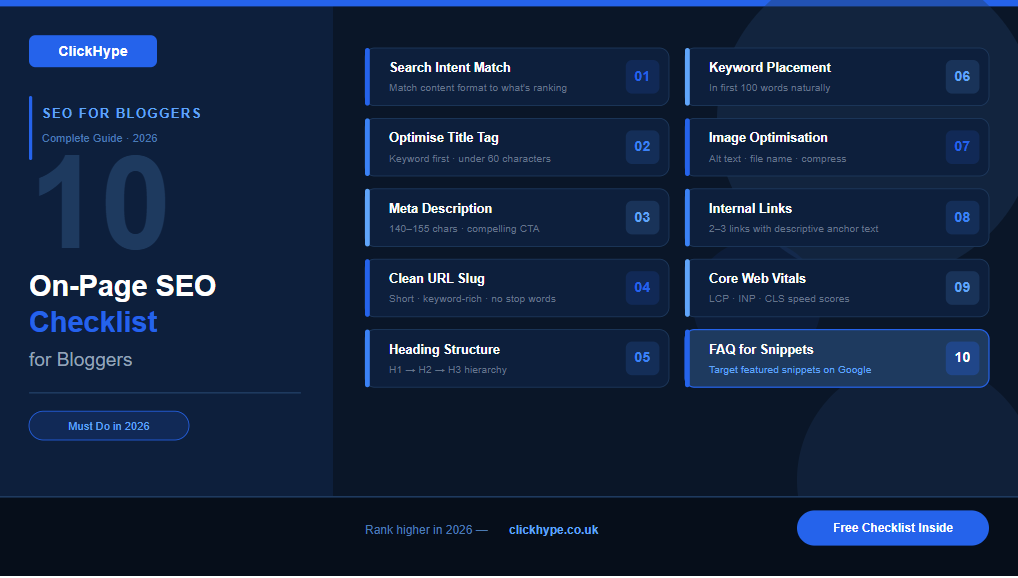
The 10-Point On-Page SEO Checklist for Bloggers in 2026
Match Your Content to Search Intent
This is the single most important item on any SEO checklist 2026 and it is the one most bloggers get wrong.
Search intent is simply the reason behind a search query. When someone types “best running shoes for beginners” they want a recommendation list. When they type “how to train for a 5K” they want a step-by-step guide. When they type “Nike Air Zoom Pegasus review” they want a detailed product review.
If your content format does not match what the searcher is actually looking for, it will not rank no matter how well optimised everything else is. Google’s job is to match searchers with the most relevant result. If your page does not fit the intent, it simply does not get chosen.
Before you write a single word, search your target keyword and look at the top five results. What type of content are they? List posts? Guides? Reviews? Videos? That tells you exactly what format your content needs to be in.
Checklist action: Search your target keyword before writing. Match your content format to what is already ranking.
Optimise Your Title Tag Properly
Your title tag is the first thing Google reads about your page and the first thing a potential reader sees in the search results. Getting it right matters enormously for both rankings and click-through rate.
For blog post SEO a strong title tag does three things:
It includes your focus keyword near the beginning. It stays under 60 characters so it does not get cut off in search results. And it gives the reader a compelling reason to click a number, a benefit, a year or a clear promise.
A weak title: “SEO Tips for Bloggers” A strong title: “On-Page SEO Checklist for Bloggers 10 Things You Must Do in 2026″
The second version has the keyword early, a specific number, and a current year all of which signal relevance and increase the chance of a click.
Checklist action: Include your focus keyword in the first 60 characters of your title. Make it specific and click-worthy.
Write a Meta Description That Actually Gets Clicks
Your meta description does not directly affect your ranking. But it absolutely affects your click-through rate which does affect your ranking indirectly.
Think of the meta description as a two-line sales pitch for your blog post. It appears directly below your title in search results and gives the searcher one last chance to decide whether your page is worth clicking.
A strong meta description for on-page SEO for bloggers:
- Is between 140 and 155 characters
- Includes your focus keyword naturally
- Tells the reader exactly what they will get from the page
- Has a soft call to action
Do not waste this space with a generic summary. Tell the reader what they will leave your page knowing. Be specific. Make it worth the click.
Checklist action: Write a meta description between 140 and 155 characters. Include your focus keyword and give the reader a clear reason to click.
Use a Clean, Keyword-Rich URL Slug
Your URL is another signal that tells Google what your page is about and it is one of the easiest on-page SEO factors to get right.
Keep your URL slug short, descriptive, and keyword-focused. Remove stop words like “a”, “the”, “and”, “for” unless they are essential. Use hyphens between words, not underscores.
Bad URL: yoursite.com/blog/post?id=2847 Still bad URL: yoursite.com/on-page-seo-checklist-for-bloggers-things-you-must-do-in-2026 Good URL: yoursite.com/on-page-seo-checklist
Short and clear wins every time. Google can read it easily. Readers can remember it. And it looks clean when shared.
Checklist action: Set your URL slug to your primary keyword only — short, hyphenated, no stop words.
Structure Your Headings Correctly
Headings are not just for formatting. They are a critical part of how Google understands the structure and depth of your content and they are a core part of any on-page SEO checklist.
The hierarchy works like this:
- H1 — Your main title. One per page, always. This is your primary keyword.
- H2 — Main sections of your post. These are your chapter titles.
- H3 — Subsections within H2s. Supporting detail under each main section.
Never skip levels. Going from H2 to H4 without an H3 in between confuses both readers and search engines. And never use multiple H1 tags that is a common mistake that dilutes your page’s topical signal.
Include your focus keyword or a close variation in at least one or two H2 headings. Do it naturally where it genuinely fits, not just stuffed in.
Checklist action: Use one H1, multiple H2s for main sections, H3s for subsections. Include your keyword naturally in at least one H2.
Include Your Keyword in the First 100 Words
This one sounds simple and it is. But it makes a real difference.
Placing your focus keyword within the first 100 words of your post signals to Google immediately what the page is about. It confirms the relevance of your content to the search query from the very beginning of the page rather than asking Google to work it out halfway through.
You do not need to force it awkwardly into the opening sentence. Write naturally but make sure the topic is established clearly and early.
Also make sure your keyword appears naturally throughout the body of the post at a density of roughly one to two percent. Do not stuff it. Do not avoid it. Just write about your topic thoroughly and the keyword will appear organically as part of good, natural writing.
Checklist action: Include your focus keyword within the first 100 words. Use it naturally throughout at around 1-2% density.
Optimise Your Images for SEO
Most bloggers completely ignore image optimisation which is a missed opportunity every single time.
Every image on your page has three SEO touchpoints:
File name. Rename your image files before uploading. “IMG_4839.jpg” tells Google nothing. “on-page-seo-checklist-2026.jpg” tells Google exactly what the image is and reinforces your page’s topic.
Alt text. Alt text describes the image to search engines and screen readers. Include your keyword or a natural variation where relevant. Keep it descriptive and concise one sentence is usually enough.
File size. Large image files slow down your page load speed which is a confirmed ranking factor. Compress every image before uploading using a tool like TinyPNG or ShortPixel. Aim for under 100KB per image without sacrificing visible quality.
Checklist action: Rename image files with keywords, write descriptive alt text, and compress every image before uploading.
Build Internal Links Strategically
Internal linking is one of the most underused blog SEO tips available and it costs nothing.
Every time you publish a new post, you should link to two or three other relevant posts on your site. And you should go back and add links from older posts to your new one.
Why does this matter? Internal links do three things for your SEO optimization checklist:
They help Google discover and crawl your content more efficiently. They pass authority from established pages to newer ones. And they keep readers on your site longer which signals to Google that your content is worth engaging with.
Use descriptive anchor text the clickable words in a link. “Click here” tells Google nothing. “On-page SEO checklist for bloggers” tells Google exactly what the linked page is about.
Checklist action: Add 2-3 internal links to every new post using descriptive anchor text. Go back and link from older posts to new ones.
Optimise for Page Speed and Core Web Vitals
Google uses Core Web Vitals as a ranking signal which means your page’s loading speed, visual stability, and interactivity directly affect how to rank on Google in 2026.
The three Core Web Vitals you need to know:
LCP (Largest Contentful Paint) How quickly the main content of your page loads. Target: under 2.5 seconds.
INP (Interaction to Next Paint) How quickly your page responds to user interactions. Target: under 200 milliseconds.
CLS (Cumulative Layout Shift) How stable your page layout is as it loads. Target: under 0.1.
Check your scores using Google PageSpeed Insights or the Core Web Vitals report in Google Search Console. The most common fixes are compressing images, removing unnecessary plugins, using a fast hosting provider, and enabling caching.
Checklist action: Run your page through Google PageSpeed Insights. Fix the highest-impact issues, starting with image sizes and unnecessary scripts.
Add an FAQ Section to Target Featured Snippets
This is one of the most powerful blog post SEO tactics in 2026 and still one of the most underused.
An FAQ section at the bottom of your post answers the most common questions related to your topic in a clear, concise format. This does two things. It increases the chances of your page appearing in Google’s featured snippets the answer boxes that appear above organic results. And it captures additional long-tail keyword traffic from question-based searches.
To write an effective FAQ section: identify two to five questions your audience is actually asking about your topic. Answer each one in two to four sentences. Be direct featured snippets favour clear, immediate answers.
You can find real questions people are asking by looking at the “People Also Ask” boxes in Google search results, or by using tools like Answer The Public.
Checklist action: Add a 3-5 question FAQ section to every post. Answer each question directly in 2-4 sentences.
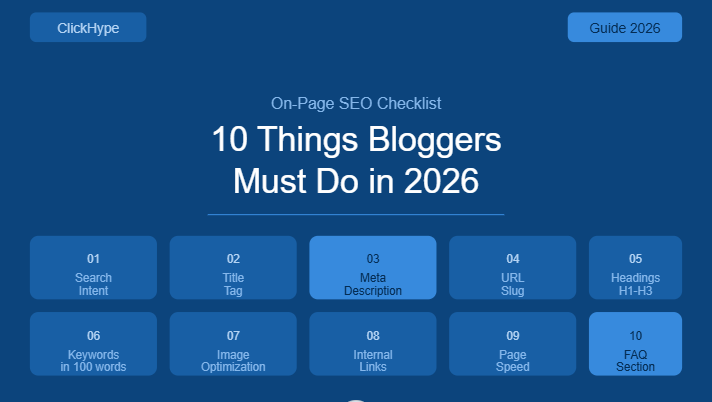
Quick Reference: On-Page SEO Checklist for Bloggers
| # | Task | Status |
| 1 | Match content to search intent | ☐ |
| 2 | Optimise title tag keyword + under 60 chars | ☐ |
| 3 | Write compelling meta description 140-155 chars | ☐ |
| 4 | Set clean, keyword-rich URL slug | ☐ |
| 5 | Structure headings correctly H1, H2, H3 | ☐ |
| 6 | Include focus keyword in first 100 words | ☐ |
| 7 | Optimise image file names, alt text, and size | ☐ |
| 8 | Add 2-3 internal links with descriptive anchor text | ☐ |
| 9 | Check Core Web Vitals and fix speed issues | ☐ |
| 10 | Add FAQ section for featured snippets | ☐ |
Common On-Page SEO Mistakes Bloggers Make in 2026
Knowing what to do is only half of it. Here are the mistakes that undo even well-intentioned optimisation:
Keyword stuffing. Forcing your keyword into every other sentence does not help it hurts. Google penalises unnatural keyword density. Write for humans first and let the keyword appear naturally.
Duplicate title tags. Every page on your site needs a unique title tag. Duplicate titles confuse search engines and dilute your ranking signals.
Missing alt text. Skipping alt text on images is a missed SEO opportunity and an accessibility issue. Always fill it in.
Ignoring internal links. Publishing posts in isolation without linking them to each other is leaving authority and traffic on the table. Build your internal link structure deliberately.
Slow pages. A page that takes five seconds to load will rank lower than a page that loads in two even if the content is identical. Page speed is not optional in 2026.
Final Thoughts
On-page SEO is not a one-time task. It is a discipline something you build into your workflow for every post you publish and every piece of older content you update.
The ten items in this checklist are not complicated. None of them require expensive tools or advanced technical knowledge. They require attention, consistency, and the willingness to do the work that most bloggers skip.
Run through this on-page SEO checklist before every post goes live. Then go back through your existing content and apply the same standards. The results will not appear overnight but they will appear. And when they do, they will be built on a foundation solid enough to last.
That is what sustainable rankings look like. That is what this checklist gives you. Now go use it.