


15 SEO Mistakes Bloggers Make (and How to Fix Each One)

Introduction
Most blogs do not fail because of one big disaster. They stall because small SEO mistakes quietly stack up: posts competing with each other, pages Google never indexes, images that slow everything down, titles nobody clicks.
The blogger is usually working hard — new posts every week, decent writing — yet traffic stays flat. That is the signature of SEO mistakes: the blog looks fine while search engines pass it by.
Here are the 15 SEO mistakes I see most often, why each hurts, and the fix — no paid tool needed, just Google Search Console and an afternoon.
What Counts as an SEO Mistake?
An SEO mistake is any habit that makes it harder for Google to find, understand or trust your content — a page blocked from indexing, a slow site, a keyword nobody searches for, or five posts answering the same question. The common thread: invisible to the blogger, obvious to a search engine.
1. Targeting Keywords Instead of Search Intent
This causes the most wasted effort: a blogger finds a keyword with decent volume, writes a good article around it, and wonders why it never ranks. The problem is rarely the writing: the article answers a different question from the one searchers ask. If searchers want a comparison list and you publish an essay, Google will not rank you.
The fix: Search the keyword and read the top five results. Note the format — list, guide, review, definition — and match it. Our guide to search intent explains the four intent types.

2. Keyword Stuffing (and Chasing Keyword Density)
Some bloggers repeat their keyword in every other sentence, convinced more mentions mean better rankings. It does the opposite: stuffed text reads badly, readers bounce, and Google has ignored keyword density for years.
The fix: Write naturally, then check the keyword appears in the title, first paragraph, one or two subheadings, and the meta description. Then use synonyms. If it sounds natural read aloud, the keyword usage is fine.
3. Keyword Cannibalisation: Your Own Posts Competing
Publish enough posts and this sneaks up on you: two or three articles target the same keyword and intent, and Google cannot decide which to rank — so it ranks none of them well. The sign: a ranking URL that keeps changing, or several posts getting impressions for one query but no clicks.
The fix: In Search Console, filter Performance by the query and check the Pages tab. If several URLs share impressions, merge the weaker ones into the strongest article and redirect the old URLs. Our keyword cannibalisation guide shows the process step by step.
4. Skipping Keyword Research Entirely
Some bloggers write whatever comes to mind and hope Google works it out. Mostly it does not: the post targets a phrase nobody types, or one dominated by far stronger sites.
The fix: Spend ten minutes checking the idea first: type it into Google and look at autocomplete, the “People also ask” box, and related searches. Pick the version a small blog can win — specific and long-tail beats broad and competitive.
5. Publishing Thin Content That Does Not Answer the Question
Thin content is not only short content: a 2,500-word post can be thin if it circles the question without answering it. The test: after reading your post, does the reader still need to search for the answer? If yes, it is thin. Google asks whether content gives a substantial, complete description of the topic, with original information or analysis.
The fix: Before publishing, ask what your post adds that the top results do not: a worked example, a screenshot of your own results, a mistake you made. One original element beats borrowed words.
6. Never Updating Old Posts
A post that ranked well two years ago slowly slides down as fresher articles appear. Bloggers respond by publishing something new instead of fixing the post that already has links, history and rankings. A refresh takes a fraction of the time a new article does.
The fix: Every six months, sort your posts in Search Console by impressions and find pages ranking 5 to 20. Update the facts, answer a question readers keep asking, improve the title, republish. Our guide to updating old posts has a full refresh checklist.
7. Ignoring Google Search Console
Google Search Console is free. It shows which queries bring people to your blog, which pages Google cannot index, and which are losing clicks — yet many bloggers never open it. Flying blind is a mistake in itself: every other item here is harder to find without it.
The fix: Set aside fifteen minutes a week: Performance for your top queries, Pages for indexing problems, Core Web Vitals for slow pages. Our Google Search Console guide for bloggers explains which reports matter.

8. Accidentally Blocking Google From Your Site
This is the quietest mistake on the list — and the most damaging. A stray noindex tag, a robots.txt rule, or the WordPress setting “Discourage search engines from indexing this site” left ticked after a redesign — and Google stops showing your pages, while your site looks perfect to visitors.
The fix: Check Search Console’s Page indexing report now. If pages show as “Excluded” by mistake, find the cause — WordPress Reading settings, a noindex box in your SEO plugin, or a robots.txt rule — and remove it. A quick blog SEO audit catches this and the other silent blockers.
9. Weak or Missing Internal Links
Every post should connect to the rest of your blog. Without internal links, new posts sit isolated — readers never find them, and Google may take weeks to discover them. Links also tell Google which pages matter most: the posts you link to most often are the ones it treats as important.
The fix: For every new post, add two or three links to related older posts with descriptive anchor text, then link back from two or three older ones. Our internal linking strategy guide explains how to build a structure that passes authority around your site.
10. Ignoring Image SEO
Bloggers upload phone photos straight into WordPress — still called IMG_4832.jpg, several megabytes each, no alt text. The page gets slower, Google cannot tell what the picture shows, and screen reader users hear only “image”. One uncompressed photo can outweigh all the text on the page several times over.
The fix: Rename every image before uploading — lowercase words joined with hyphens — and compress it under about 200 KB. Write alt text describing what the image shows, in plain language, around 80 to 125 characters. Our image SEO guide covers file names, alt text, formats and compression in full.
11. Titles and Meta Descriptions Nobody Clicks
You can rank on page one and still get almost no traffic if your title and description do not earn clicks. A vague title or a description that repeats the title hands your clicks to the result above or below you. Changing a title takes a minute, and the effect shows within days.
The fix: Write titles that promise a specific benefit — a number, a timeframe, the exact outcome — and keep them under 60 characters. Write the meta description as a 150-character invitation, not a summary. Our featured snippets guide shows how clear, direct answers can win the top spot too.
12. Ignoring Page Speed and Core Web Vitals
Readers leave slow pages. Google measures that with Core Web Vitals: how fast the main content appears, how quickly the page responds, whether things jump around while loading. A blog taking six seconds to load on a phone loses readers before they read a word. The usual culprits: oversized images, too many plugins, heavy themes.
The fix: Test your most important pages with PageSpeed Insights and fix the biggest item first — usually image sizes. Then remove plugins you do not use. The first round of fixes brings the biggest improvement.
13. No Topical Authority — Random Posts on Random Topics
A blog publishing a recipe on Monday, a crypto guide on Wednesday and a travel diary on Friday gives Google no reason to trust it on any one subject. Topical authority means a blog covering one topic deeply ranks better than a blog skimming ten. Every post starts from zero because the blog has no authority in that subject.
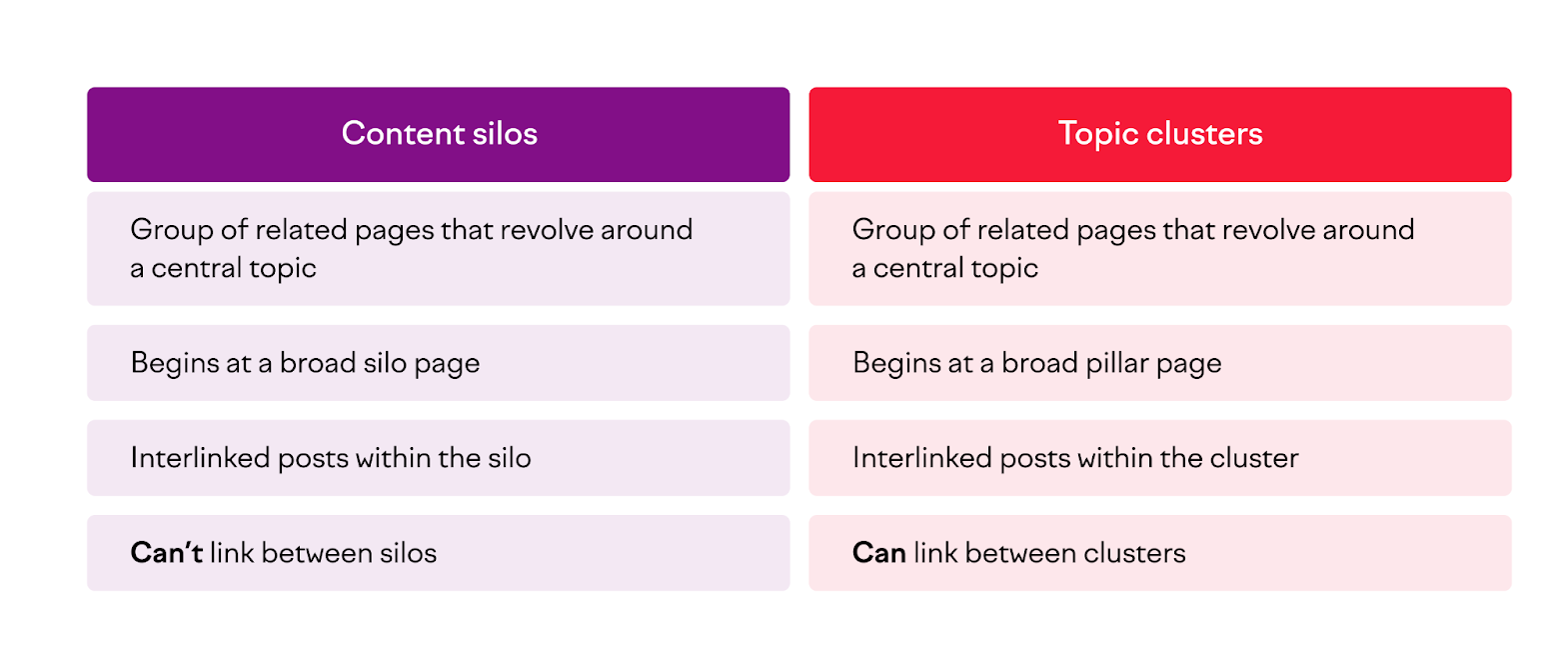
The fix: Pick one main topic area and build clusters of related posts around it, all linking to each other and to one pillar article. Ten connected posts beat thirty scattered ones. Our topical authority guide shows how to map a cluster for your niche.
14. Ignoring E-E-A-T: No Proof Anyone Real Wrote This
Google looks for experience, expertise, authoritativeness and trust — E-E-A-T — especially on advice affecting money or health, but increasingly everywhere. A blog with no author names, no about page, and no evidence the writer has done what they write about gives Google and readers little reason to trust it.
The fix: Put a real author byline on every post, write an about page saying who you are and what you have done, and include first-hand details — your own results, screenshots and mistakes. Our E-E-A-T guide for bloggers covers the practical steps.
15. Treating SEO as a One-Off Task
The final mistake is a mindset one: a blogger spends a month on SEO, sees little change, and quietly stops — or assumes the work is done once the plugin is installed. SEO compounds slowly: rankings move over weeks and months, not days. Quitting in month three is the most common ending for a new blog, right when long-tail rankings usually start to appear.
The fix: Make SEO a routine, not a project: a monthly fifteen-minute Search Console check, a quarterly refresh of your best posts, steady publishing. For the non-SEO side, our post on common blogging mistakes covers the habits that hold blogs back.
Which SEO Mistakes Should You Fix First?
Not all fifteen are equal. With one afternoon, fix them in this order: check you are not blocking Google (mistake 8); open Search Console and look at your real data (mistake 7); fix keyword cannibalisation (mistake 3); refresh your best old posts (mistake 6). Then work through the rest.

Frequently Asked Questions
What is the biggest SEO mistake bloggers make?
Targeting keywords without matching search intent. Even a perfectly written page struggles to rank when it answers a different question from the one searchers ask. Always read the top results for your keyword before writing.
How many SEO mistakes can hurt a small blog at once?
Usually several — thin content, weak internal links, unoptimised images and no Search Console routine are a common combination. The good news: fixing them compounds.
Can SEO mistakes be fixed, or is the damage permanent?
Almost all of them. Google re-crawls regularly, so changes to titles, content, internal links and indexing take effect over days or weeks. The exception is trust lost from buying links or mass-publishing spammy content, which takes much longer to recover from.
How long does it take to see results after fixing SEO mistakes?
Small fixes like better titles can show up in Search Console within a week or two. Bigger changes — merging cannibalised posts, refreshing old content, building topical authority — usually take four to twelve weeks.
Do I need paid SEO tools to find these mistakes?
No. Google Search Console and PageSpeed Insights are free and surface most of the mistakes on this list. Paid tools add convenience, not information you cannot get for free.
Conclusion
SEO mistakes are rarely dramatic. They are quiet habits — a keyword stuffed into one more sentence, a post published without checking Search Console, an image uploaded at full size — repeated until they cost you real traffic. The fix is a short routine: check indexing, read your Search Console data, fix the biggest problem first, and keep going.